
Wondering how to extract data from Tableau? This blog post answers exactly this question.
In this article
- Data in Tableau
- Data Extraction from Tableau: Data Sources
- How to Extract Data from Tableau: Techniques
- Frequently Asked Questions on Data Extraction
Before we discuss how to extract data from Tableau, let's take a look at some of the Tableau basics.
Data in Tableau
Tableau, a popular visual analytics platform, can import data from almost anywhere. It stores all of this data in four different data types. Those types are:
- String is a 'string' of characters — this could be anything from text to URLs. For example, "hello" is a string of five characters.
- The number is quite self-explanatory; any numerical data is stored as a number.
- Boolean only has two possible values — true or false.
- DateTime — date or time. Tableau supports almost any date or time format.
Tableau will automatically assign a type to your imported data. You can change this type manually under certain conditions.
Data Terminology
Here's a quick list of data jargon terms and what they actually mean when using Tableau.
- Field — a single piece of data in one of the forms from above, i.e., a string or number
- Row — a collection of fields that make up a row in a data table
- Calculated Field — a new field that you create yourself by combining values from other fields in a dataset. This is how you can create data rows using the fields you already have
- Dimension — a field that contains categorical data. For example, dates or product names
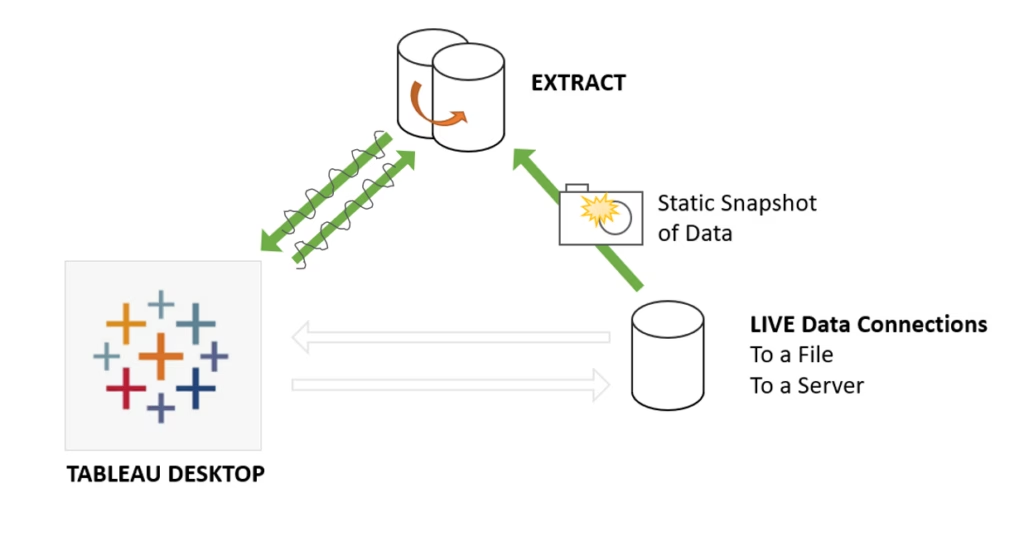
- Extract — a section of a data source page that is 'extracted' and saved in memory. There are a few reasons to do this, as we'll see below.
Data Extraction from Tableau: Data Sources
Tableau can extract data from all of the popular data sources. These include:
File System
The simplest data source you can use with Tableau is a file. These could be files like an Excel spreadsheet, a CSV file, or a text file.
Cloud System
You can also source data from popular cloud sources. Some of the options are:
- Google Analytics
- Google BigQuery
- Windows Azure
- Amazon Redshift
Relational systems
You can connect to many types of relational databases, such as SQL Server, Oracle, and DB2.
API Systems
Live Data Sources
Connect Live is a feature of Tableau that allows you to connect to real-time data. Tableau does this by constantly reading the data, so your visualizations are constantly up-to-date. This is an awesome feature that allows you to make live charts that change as the data does. The only downside is that this will put a lot of strain on the data source you are using.
Using In-Memory Data
The alternative to connecting to a live data source is to load one into memory. This is a better option for static data that won't change anytime soon, as it will only be loaded once. The in-memory database will then be analyzed by Tableau. There will, however, be a limit to the size of the database that can be loaded into memory.
Connecting Multiple Data Sources
One of the great features of Tableau is the ability to combine data sources. You can work with data from a file system and data from a relational database all at the same time. All you need to do is define multiple data connections.
Once you've decided on your data sources, the next step is to extract the data you need from those sources.
How to Extract Data from Tableau: Techniques
Whether you are connecting to a live database or storing your data in memory, you may well want to cut it down to only what you need for your application. This will mean you'll have less data to extract from a live source or a smaller amount of data to store in memory.
It also converts the data to a form that works well with the Tableau engine, meaning things will speed up even more.
With Tableau, this is done with data extracts.
A data extract is simply a subset of a total data source. When extracting data, you can choose exactly what you want and how much of the underlying data to extract using the extract data dialog box.
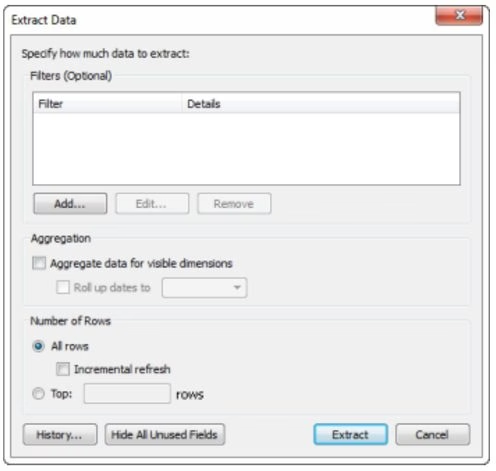
To create a new Tableau data extract, go to Data -> Extract Data. You'll be presented with many options to limit the number of rows and aggregate for dimensions. Here is where you can use filters to cut down your data to just the things you need.
Filtering Extracted Data
You might not need every single field and row in the data you've extracted. By cutting it down to just the things you need, you can improve performance and make life easier for yourself.
There are three main types of filters to use in Tableau
- Dimension filer
- Measure filter
- Date filter
Each works on a different type of data field. To apply a filter, simply drag a field into the filter pane.
Then you'll be prompted with some options for your filter. Choose the ones you need and click Apply.
Once you've created a data extract, you can add more data to it from the data pane. Do this by going to Data -> Extract -> Append to File. You can do this with new data types, just make sure they are the same type and have the same number of fields as the original data.
Tableau Large Datasets
It's possible to work on large data sets using Tableau. Things do, however, get a little more difficult if your dataset doesn't fit in memory. This is where data extracts and filters really come in handy. If your data is still too big to fit in RAM after extracting and filtering it down, it will still work, but it will run a lot more slowly.
Finding Developers to Help You Out
If all of the above seems a little too much for you to do yourself, there are specialist teams that can help you out. Read our blog, "How to find data analysts and software developers" who are experts at setting up your data servers, sources, and visualizations.
Putting it All Together
We've explained how to extract data from different sources with Tableau, a really powerful data extraction software. Using all the above techniques, you can import server data from multiple data sources, including your own files, cloud storage, or other databases.
You can then use all of this to generate beautiful visualizations, all in real-time, for almost anything you can imagine. Moreover, you can also export data in various formats.
You can also use some great tools like Tableau extract filters to trim and store the filtered data locally to make it all work at lightning speed. Or, you can connect to a live data set and have your visualizations display live, up-to-the-second information.
Whatever your application, Tableau is a great tool for combining different types of data and turning it into appealing visuals for your audience.
Business data is an important asset, and you do not want to face any mishandling while exporting data due to a lack of experience and expertise.
If you want to make use of Tableau data extracts professionally, partner with experienced data engineers who can help you efficiently with various aspects of exporting Tableau data, like managing Tableau servers, working with the Tableau desktop application, etc.
If you are looking for experienced data engineers to help you extract important data values from tables and files, DevTeam.Space can help you. We have expert software engineers and data analysts who are experienced in using the latest tools and technologies.
You can write to us your initial data extraction requirements via this quick form, and one of our technical managers will get back to you for your further assistance.
Related to data extraction from Tableau articles
Here are a few articles that might also interest you:
Frequently Asked Questions on Data Extraction from Tableau
Data extraction is the process of retrieving data from various sources, either for the purpose of storing extracted data in a secure depository, such as the cloud, or for its migration to new systems.
You are strongly advised to seek the help of a professional data extraction expert when extracting your data. Unless you have the relevant expertise, mistakes made in extracting data could lead to either lost or corrupted data.
You can find data extraction experts online. You should take care to vet their experience claims and review previous customer feedback before making a decision.