8 Best AI for Coding Tools in 2026 I Reviewed Hands-On

Second Talent data shows AI-assisted coding can save 30% to 75% of a developer's time. Now, those gains aren’t the result of faster code suggestions. They come from AI systems taking responsibility for larger chunks of the development workflow.
If you are a professional developer or part of an engineering team, the question is no longer whether to use AI. It’s "Which tools are safe and effective to use on production code?". If you are a business owner responsible for uptime, security, and delivery velocity. I'm sure you face the same challenge from a different angle.
Not all AI coding tools are built for the same job. Some tools excel at managing changes across large, complex codebases. Others prioritize speed for rapid prototyping. A few give experienced developers complete control over models, context, and automation, but require more configuration upfront.
This is why I sifted through 30+ popular AI coding assistants and came up with the 8 best built for production development. Instead of arbitrary rankings, I grouped these by function and explained where each one fits and where each fails.
By the end, you'll understand when standalone editors outperform extensions, how to mash up tools into your development workflow, and when it makes more sense to bring in a professional development team to move faster without accumulating technical debt.
(Click here to jump to the vetted list.)
In this article:
- Quick Comparison: 8 Best AI for Coding Tools by Use Case
- What are AI Coding Assistants?
- How do AI Coding Tools Compare vs Other Tools?
- 8 Best AI Tools I Recommend for You in 2026
- Common Failure Modes Teams Should Watch For
- How Teams Should Use AI Coding Tools
- When to Hire Development Teams
- Consider the Hybrid Approach (Most Effective)
- Working with AI Coding Tools
- FAQs About AI Coding Tools
Quick Comparison: 8 Best AI for Coding Tools by Use Case
| Featured Tool | Best for | Setup Complexity | Control vs Convenience | Best Team Size | Not Useful for |
| Cursor | Refactoring systems that span 10+ files simultaneously | Low (VS Code users) | High control with model switching | 1-50 developers | Terminal-first developers, teams unwilling to switch from JetBrains |
| Windsurf | Teams where developers refuse to standardize on one editor | Medium (per-IDE setup) | Medium control | 5-100 developers | Solo developers who are committed to one editor, or teams who need the deepest AI integration |
| GitHub Copilot | Teams that are 100% invested in GitHub: repo management, PR reviews, issue tracking | Low (one-click install) | Low control (limited model choice) | 1-1000+ developers | Non-GitHub users, or teams that need a custom model config |
| Cline | Cost-conscious teams who want to switch between fast models for simple tasks and expensive smart models for more complex work | Medium (API key setup) | Maximum control | 1-10 developers | Teams wanting plug-and-play simplicity, non-technical users |
| Roo Code | Projects that need separate AI personalities: each with its own permissions | High (requires prompt engineering) | Maximum control | 3-30 developers | Beginners to AI tools, teams without time for configuration |
| Continue | Teams that are building their own proprietary AI workflows | Very high (framework configuration) | Maximum control | 5-50 developers | Teams wanting ready-to-use tools, organizations without AI/LLM expertise |
| Tabnine | Teams in regulated industries where they are not allowed to send code to external servers | Very high (infrastructure setup) | Medium control | 10-1000+ developers | Startups without DevOps resources, teams comfortable with cloud tools |
| Claude Code | Visual debugger users and teams relying on IDE file trees and split panes | Low (if terminal-comfortable) | Medium control | 1-20 developers | Visual debugger users, teams relying on IDE file trees and split panes |
What are AI Coding Assistants?
AI coding tools use large language models to assist developers with writing, reviewing, and maintaining code. They live right in your dev environment (IDE, terminal, or browser) and use your codebase to give you context-aware suggestions and automate repetitive tasks.
Think of them as teammates handling mechanical work: boilerplate generation, syntax correction, and basic refactoring. However, they don't try to make architectural decisions or understand business needs without some human input.
Since they already handle repetitive and standard development work, the rest of the development team can focus on business logic, reviewing code, and complex problem-solving. It's for this reason that they are also called AI pair programming partners.
What are the Key Abilities of AI-Powered Coding Tools?
- Code Generation from Context: These tools analyse your existing code (e.g., file structure, dependencies, naming conventions) to give suggestions that actually fit your project.
- Multi-File Reasoning: When you modify a database schema, they identify which API endpoints, frontend components, and tests need to be updated.
- Natural Language to Code: You can describe what you need in plain English (e.g., "add error handling to this API call" or "refactor this function for better performance") and the tool translates that into working code.
- Approval-Gated Execution: Most tools show you exactly what they plan to change before committing to various programming tasks, which prevents the "black box" problem where AI makes changes you don't understand.
- Model Flexibility: Many tools let you switch between different AI models mid-project, such as using faster models for simple tasks, and more capable models for complex reasoning.
How do AI Coding Tools Compare vs Other Tools?
vs Vibe Coding Tools
Vibe coding tools (e.g., Replit, Lovable, and Bolt) are mainly designed for non-technical users to build prototypes through conversational prompts. They're all about speed and accessibility; getting from idea to demo without writing code. Since requests are done with essentially an AI chat and natural language, there's no guarantee that it will produce clean code.
AI-powered coding tools, by contrast, are built for developers or engineers who already code and integrate into your existing workflow. Where vibe code tools will generate an entire application autonomously, AI coding tools have advanced AI features designed to assist with specific tasks. These include, but are not limited to, completing a function, error handling, debugging across files, fixing code, or refactoring a module.
vs General-Purpose LLMs
Tools like ChatGPT or Claude's web interface and chat window can generate code when you paste a snippet and ask a question. But they operate in isolation - they don't see your codebase, they don't understand your architecture, and they can't track dependencies across files. They might not give functional code, as their code generation ability is limited to basic tasks and not complex scenarios.
AI coding assistants, on the other hand, live inside your development environment. They index your entire project, understand how files relate to each other, and generate suggestions that fit your existing patterns. When you modify a database schema, they identify which API endpoints need updating. When you refactor a function, they catch breaking changes in tests.
vs Traditional IDEs
Traditional IDEs like VS Code or JetBrains provide syntax highlighting, auto-complete based on static analysis, and debugging tools. But they don't have the intelligence to reason about intent or generate new logic.
AI-based coding tools, by contrast, add reasoning capabilities on top of all those traditional IDE features. The difference is that AI-powered coding tools can actually generate code. So instead of just auto-completing variable names, they can write entire functions based on what you're trying to accomplish, suggest architectural improvements, and catch logic bugs before runtime.
8 Best AI Tools I Recommend for You in 2026
I've grouped these AI-powered development tools by function: what they actually do and where they operate. That way, you can answer the main question that matters for you or your team: "Which is the best AI coding tool that fits with how I/we already work?"

Get a complimentary discovery call and a free ballpark estimate for your project
Trusted by 100x of startups and companies like



AI-First Code Assistant (Forks/Standalone)
These are completely new development environments built from scratch with AI as the core feature, not an add-on. They look like traditional editors, but every feature (file navigation, search, debugging) is designed around AI assistance.
You're switching editors entirely, though, so it's a trade-off between deeper integration and relearning your workflow.
1. Cursor
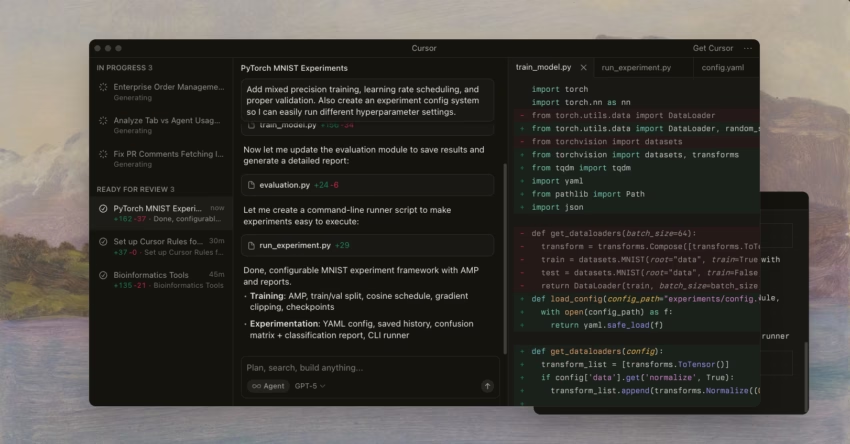
Cursor is a Visual Studio Code fork that turns multi-file refactoring from a multi-hour slog into a coordinated operation.
When you're working on a big project where changing one thing means updating ten or more files at once (think authentication layers, API migrations, or database schema changes), Cursor's Composer system makes it easy to update everything in one go.
And since it runs on the same foundation as Visual Studio Code, your extensions, shortcuts, and muscle memory all just transfer over.
What sets Cursor apart is its flexibility with AI models. You're not locked into using one AI provider.
Want to switch from GPT-5 for some speed to Claude Code for deeper reasoning mid-project? No problem.
You can do that without losing any context. This really matters during refactoring sessions where you need real-time code suggestions for boilerplate, but deeper analysis for business logic changes.
Features
Composer handles multi-file operations by letting you describe architectural changes in plain English. The code assistant then proposes updates across your schemas, endpoints, frontend code, and tests all at the same time.
Model switching lets you optimise for speed vs reasoning per task: Use GPT-5 to generate boilerplate, then switch to Claude Code when refactoring complex business logic.
The Fusion Tab predicts what comes next in your code, not just the current line. Lastly, inline diff shows exactly what gets modified, added, or deleted before you commit with a side-by-side comparison.
Level of Control
Composer proposes changes across all affected files. You review the full diff and approve before anything gets touched. This prevents the common problem where AI modifies 47 files with new code, and you have no idea what happened.
Meanwhile, Fusion Tab operates more autonomously with real-time predictions, but you still control what gets accepted. The tool strikes a balance: enough automation to save hours on multi-file operations, enough human oversight to prevent architectural mistakes.
However, you need to make all architectural decisions about how systems should connect. Every multi-file operation requires your explicit approval before execution. And while the tool makes things easier, final code review before deploying to production remains your responsibility. The AI just doesn't get your specific edge cases or business constraints.
Decision Criteria
- Use Cursor if: You're refactoring systems that span dozens of files, working with thousands of files in your codebase, need to switch between AI models based on task complexity, already comfortable with VS Code.
- Skip Cursor if: You mainly work in the terminal, don't want to switch from JetBrains, or your machine has less than 16GB RAM (performance takes a hit). If you rely on CLI usage or are on a tight budget, then Cursor might not be the best fit.
AI IDE Extensions
Not everyone wants to use a standalone tool. Some people already have their dream editor set up just right, and now they want to add AI on top without having to change everything.
IDEs add AI capabilities to the editor you already use, usually in the form of an AI assistant. These either work in one editor (like Cline in VS Code) or across multiple editors (like Windsurf in PyCharm, VS Code, and Vim).
The benefit is that your workflow stays intact, and you don't have to worry about learning a new tool.
2. Windsurf
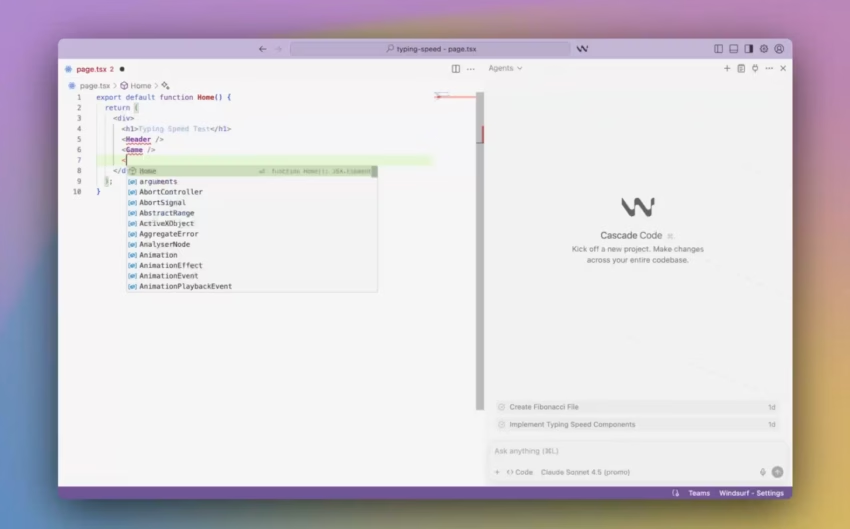
Windsurf is designed to solve a typical problem: get everyone onto one editor. If your team is already disparate, with some members liking PyCharm, some Android Studio, and some Visual Studio Code, Windsurf works across 40+ IDEs with the same level of functionality in each.
AI assistance feels the same whether you're in PyCharm or VS Code - no degraded features, no “this works in the main IDE only” limitation. Cascade AI adjusts on the fly, moving from quick autocomplete for simple tasks to deeper analysis when you're debugging or doing large refactors.
Features
Fast Context indexes and searches codebases, so you can get to relevant files quickly. This is especially useful in multi-file projects. It also offers live code suggestions with Supercomplete, where Windsurf predicts your next action, not just what code you might type.
Meanwhile, DeepWiki gives you hover documentation showing what a function does, what it takes in, what it results in, and project dependencies.
Vibe and Replace handles batch editing across hundreds of files at once: Fast mode for quick replacements and Smart mode for context-aware changes. You can even view live applications in a built-in browser without having to leave your editor.
Level of Control
Cascade operates in medium autonomy mode, adapting on the fly between quick suggestions and deeper analysis. Larger operations pause for approval: you get to see proposed changes before they are applied across multiple files. This helps ensure your key features get programmed in the way you conceptualized them.
The system assumes you want speed for obvious tasks (syntax fixes, adding imports) and asks for confirmation on structural changes (refactoring class hierarchies, modifying API contracts).
Every multi-file edit requires your approval before execution. With Windsurf, you get to make all the architectural decisions about how components fit together.
Decision Criteria
- Use Windsurf if: Your team uses different editors and standardizing isn't realistic, you need consistent AI functionality across IDEs, or you want built-in browser debugging.
- Skip Windsurf if: Your team already standardized on VS Code (dedicated tools offer deeper integration), you're a solo developer who doesn't need multi-IDE support, or you want to avoid OpenAI ecosystem dependency.
3. GitHub Copilot
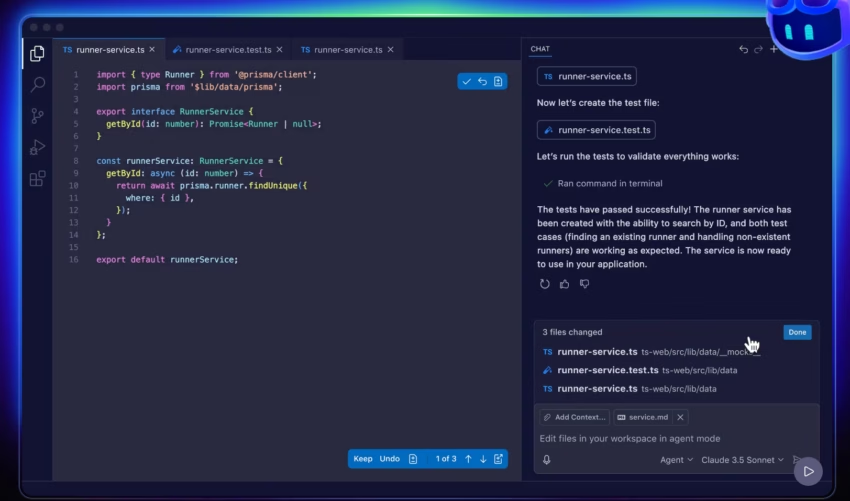
GitHub Copilot is the right AI coding assistant for you if your entire workflow is 100% GitHub-based. That means all your code generation, repository management, issue tracking, and pull request reviews happen inside GitHub. Since Microsoft already owns GitHub and VS Code, integrations between the two are much easier to access.
Copilot’s code suggestions will be based on your project’s pattern, which it retrieves from team conversations, open issues, and repository history.
Not only that, but Agent Mode also understands your repo’s context. Thus, it can suggest architectural improvements based on your commit history or even review pull requests for bugs before developers check them.
Features
Agent Mode can use plain English to handle multi-file edits (repository-wide debugging and architectural suggestions), complete with approval gates, so you can greenlight instructions to plan tasks, or run tests and commands. Anything more specific can be done with Custom Instructions, so you can define coding standards, preferred languages, and framework conventions your team follows.
Meanwhile, Edit Mode provides fine-grained control over code modifications so you don’t have to review code in chunks.
Lastly, Code Review will automatically look for bugs and potential improvements in pull requests before senior developers do more in-depth code checks.
Level of Control
GitHub Copilot has a built-in review process, where you approve and reject each suggestion or plan before Agent Mode starts working behind the scenes. While this is great for easy tasks (such as updating API calls to the new version), Copilot defers to your instructions for more in-depth requirements.
In fact, you review all Agent Mode operations before they happen. When it comes to final architectural decisions, you still call the shots, as you know your project more than the AI. The tool accelerates implementation but doesn't replace judgment about what to build.
Decision Criteria
- Use GitHub Copilot if: Your workflow is 100% GitHub-based, you need repo context integration beyond just code, you're a student or open source maintainer (free Pro tier).
- Skip GitHub Copilot if: You're not using GitHub at all, you need to customise the AI model, or you want to avoid getting tied in with Microsoft's ecosystem.
4. Cline
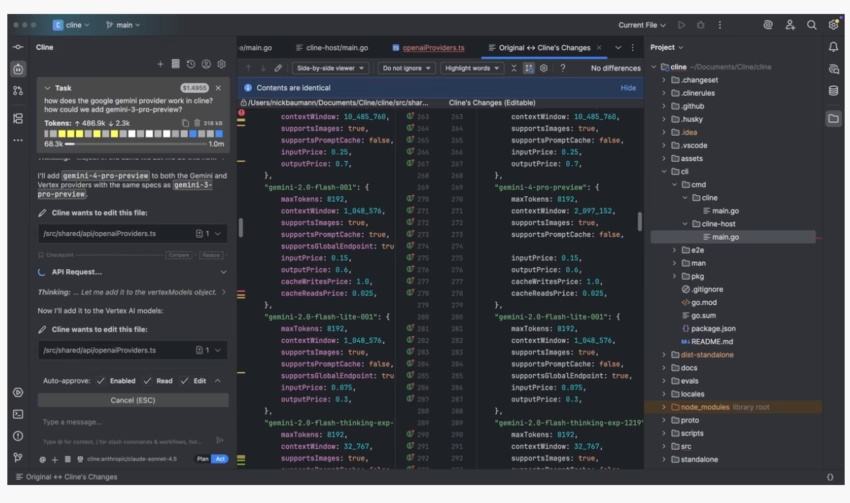
Cline is the tool for developers who want to keep their costs and their model selection under their own control. Instead of paying a fixed subscription, you connect your own API keys from OpenAI, Anthropic, or other providers.
This means you control exactly which models you use for different tasks: free GPT-3.5 for generating boilerplate, and the fancy Claude Opus for complex refactoring.
If you're a cost-conscious team, then this matters: you're not paying a fixed subscription fee, since you're just paying for what you actually use.
Within the platform, Cline has separate Plan and Act Modes. The Plan mode will analyze your code and propose modifications for you to review. Upon approval, Act Mode kicks in and executes the changes. Thanks to this two-step process, AI will no longer make changes you didn’t want or understand.
Features
With the Plan and Act mode, you get a built-in review process. You see what Cline wants to change, you review everything, and only then do you let Act mode make the changes.
There is also MCP (Model Context Protocol) support, allowing you to create custom tools for specific tasks such as API connections, database queries, and external service integrations.
You can also customize the context window, so you can only get the code relevant to the task you are working on.
1,200 top developers
us since 2016
Multi-provider flexibility works with OpenAI, Anthropic, and Google Gemini, letting you optimize for cost versus quality per task.
Level of Control
The Plan and Act Mode separation creates a mandatory review checkpoint. You see the proposed changes of the AI and the reasoning behind them before it affects the entire project. This does take some time upfront, but it can prevent costs in the form of tech debt or wrong implementation.
Moreover, managing API keys and tracking usage costs are now your responsibility. Without the right computations, you might end up spending more in terms of AI upkeep.
Decision Criteria
- Use Cline if: You're cost-conscious and want to optimize spending per task, you need control over model selection, you're comfortable managing API keys and tracking usage.
- Skip Cline if: You want plug-and-play simplicity with no configuration, you're unfamiliar with API management, and you prefer predictable monthly costs over variable usage-based pricing.
5. Roo Code
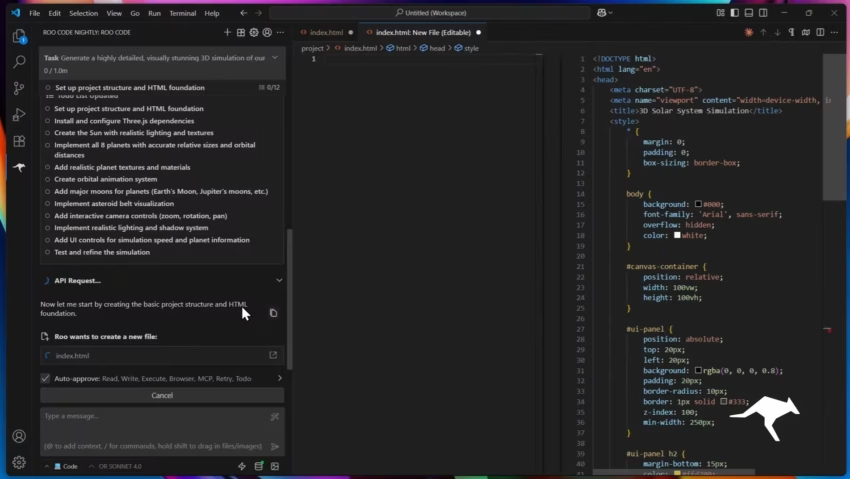
Roo Code started as a Cline fork but added something unique: specialised AI personalities. Instead of relying on a single AI to do everything (from writing code to planning architecture to debugging and documentation), you switch between different modes, each with its own distinct personality and prompted AI features.
This distinction matters because an AI with precise instructions can produce more accurate results. For example, a security-focused AI is going to catch things that a general-purpose AI has a higher chance of missing out on.
Features
Roo Code has five base modes that cover the different development stages: Code (for getting the code written), Architect (for planning the system), Ask (for questions and answers), Debug (for isolating and fixing errors), and Custom (for creating your own AI specialists).
Within Custom mode, you can create AI coding assistants with specific instructions, tool access, and permissions that are tailored to your particular workflows; whether that's security reviews, documentation generation, or test coverage analysis.
You can also perform multi-file operations within the terminal, which means refactoring tasks that affect multiple files can be done much faster. For added safety, Roo’s step-by-step approval workflow means you will know which changes will happen where before applying them.
Level of Control
The mode-switching workflow in Roo Code means you get to choose the right AI personality for each task phase, but this also needs understanding of what each mode does.
Moreover, Custom Mode needs configuration upfront of what it can and can’t do within your project. These setups might make time, but this can eventually make recurring workflows much easier.
The approval workflow means multi-file operations will stop until you have reviewed the steps the AI will perform. However, after giving permissions, a team of well-defined AI specialists can perform more accurately compared to the “one-size-fits-all” AI bot of other tools.
Decision Criteria
- Use Roo Code if: You need an AI that's specifically tailored to different stages of the development process, such as security audits, testing, or documentation, and you're willing to put in the time to configure Custom modes.
- Skip Roo Code if: You're new to AI tools and you're not sure where to start, you don't have the time to set up Custom mode, or you prefer the simplicity of a single, straightforward assistant with no messing about with different modes.
6. Continue
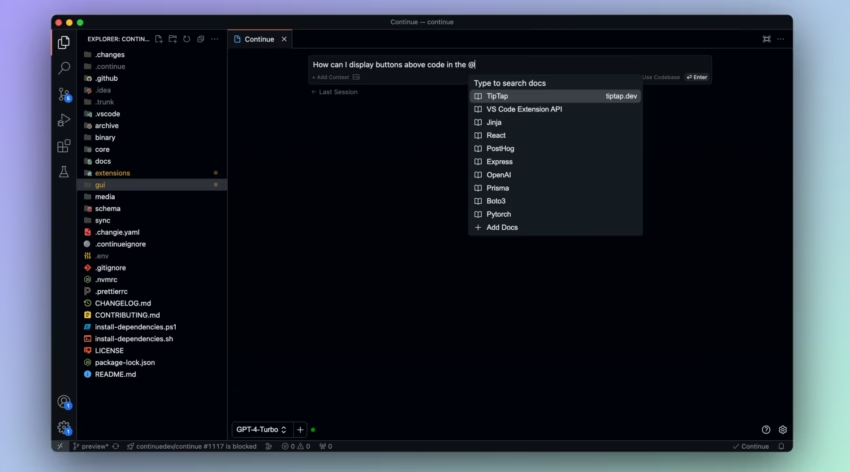
Unlike other AI coding assistants, Continue isn’t a ready-to-use solution. Instead, it’s an open-source framework for building your own customized AI code assistants. This matters when your team has complex automation needs that go beyond what the standard tools can provide.
Continue uses MCP to connect to systems that standard tools can't access - like internal APIs, proprietary databases, custom authentication, and legacy documentation systems that aren't public.
Features
Since Continue uses MCP (Model Context Protocol) integration, you can connect your Continue-built assistant to web APIs, process images, pull data from internal services, and even integrate with external tools. Multi-provider support works with all major LLM providers and even lets you use local models, so you choose the best model for the job without platform lock-in.
The platform also lets you encode your specific architectural patterns, internal APIs, and workflow conventions into custom agents. That way, instead of generic code completion, you get intelligent code suggestions tailored to how your team actually builds software.
The level of customization also goes beyond code generation, as you can build AI workflows that interact with your proprietary databases, custom authentication services, and internal documentation repositories.
Level of Control
To get Continue working for your team, you need to build your own custom agents and MCP integrations, which is a bit of a high-touch process. As an open-source framework, Continue can only work once you have put in the time to set up multiple models. However, this does create a barrier for teams that are looking for instant productivity gains.
You build and maintain workflow-specific agents as your needs change. This means figuring out how the MCP protocol works is crucial when you want to configure your integrations and troubleshoot when they go wrong.
To get optimal results out of context management, you need to experiment; if you have too much context, your AI gets confused. However, adding too little context might give generic or repetitive code.
Ideally, you'd have AI engineers with expertise in AI/LLM on hand to get the most out of these advanced AI capabilities, not just developers who happen to know how to use the tools.
Decision Criteria
- Use Continue if: You're working with custom AI workflows that need to connect to internal systems that no off-the-shelf tool can get to, there are AI/LLM experts on your team, and you want the ability to tailor the AI to your needs.
- Skip Continue if: You want to use a tool that's already set up and doesn't need configuration, your team doesn't have anyone with AI expertise, you need productivity gains right now, not after weeks of messing around with setup.
7. Tabnine
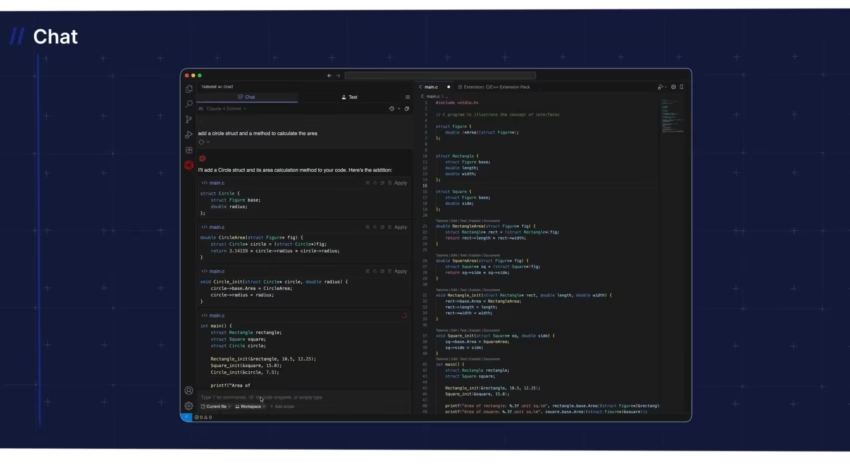
Tabnine solves one major problem: you can't legally send your code to external servers.
Healthcare organizations dealing with PHI, financial institutions with strict data policies, and government contractors with security clearances. They can't use cloud-based AI tools that send code to OpenAI or Anthropic for processing.
Tabnine runs entirely on your own servers, so your code never leaves your hardware, never touches external APIs, and all AI operations happen locally on your network.
Since Tabnine supports self-hosted deployment, this means you're in control of the whole data flow.
Its Private Training learns from the patterns in your codebase, internal APIs, and architecture conventions without sending any data outside your infrastructure. You get audit trails, data sovereignty, and compliance with regulations that forbid external code processing
Features
Tabnine's self-hosted deployment works with all the major IDEs (VS Code, the JetBrains suites, Sublime Text, and Atom), and all the operations happen right on your infrastructure. AI features like code completion, suggestions, and refactoring all happen offline.
Meanwhile, Private Training takes a close look at your codebase so that it can provide intelligent code assistance tailored to your proprietary code (your internal APIs, architectural patterns, and naming conventions) without sending any data to external servers.
Level of Control
Tabnine focuses on AI-powered code completion and suggestions rather than trying to do everything on its own. It suggests that you decide what to do with it.
This is especially useful in regulated environments where you can't afford to have the AI make autonomous changes that could create compliance risks. It works more like a smart autocomplete than a coding partner, which gives you a lot of control over what it does while also limiting its potential to cause problems.
All the coding decisions stay with you. Tabnine just provides suggestions; it doesn't make any changes without you telling it to. This does mean you have to deal with the servers, updates, and monitoring performance. Model updates and deployment require you to do some work to update your self-hosted instance; it's not all going to happen automatically in the cloud.
Decision Criteria
- Use Tabnine if: You're in a regulated industry that needs data sovereignty (healthcare PHI, financial data, government clearance), compliance forbids sending code to external APIs, and you've got the DevOps resources to handle self-hosting.
- Skip Tabnine if: You're a startup that doesn't have the resources to handle DevOps, you're used to using cloud tools, or you want to get cutting-edge AI capabilities that are always up to date.
CLI-Native AI-Powered Coding Assistant
Command line interface (CLI)-native tools are built for developers who spend most of their time in the terminal, and who don't want to have to switch to an editor. Code development happens entirely in the terminal, with no GUI and no visual editor.
The benefit is that you get to stay in your terminal workflow, but the limitation is that you don't get visual debugging or file tree navigation.
8. Claude Code
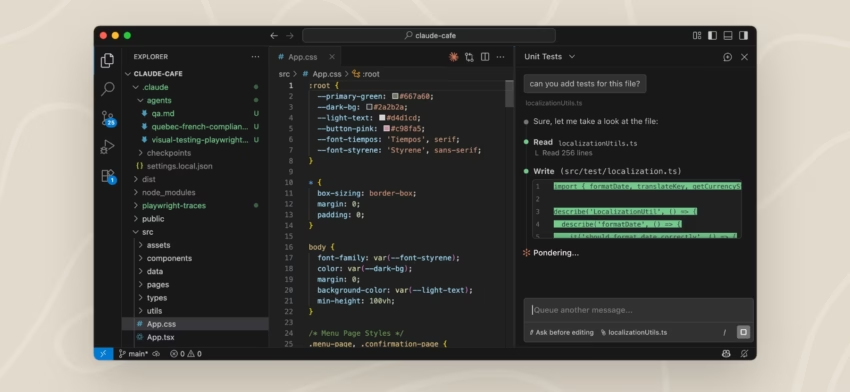
Claude Code brings Anthropic's Claude AI directly into your terminal for developers who script everything (CI/CD pipelines, remote servers, containerized environments), where GUI tools just get in the way.
You can type what you need in plain English, and Claude Code will do it in the terminal with no editor required. This makes sense in headless environments, SSH sessions, and automated workflows where switching to a visual editor just breaks the flow.
What sets Claude Code apart: it has direct API access to Anthropic's Claude without any middleware layers to mess up the response. This means you get the full capabilities of Claude's AI chat, optimized for command line workflows (file operations, Git integration, approval gates), all terminal native.
Features
Claude Code lets you create terminal-native operations that accept natural language prompts. You describe what you need, and Claude Code translates it into commands and code without ever leaving the terminal.
Having direct access to the Claude API gives you intelligent suggestions and code completion without any middleware getting in the way. It also has Git integration that handles commits with context-aware commit messages based on what you actually changed.
Moreover, there are approval gates that show proposed modifications in the terminal output. You can review the changes as a text diff, approve or reject, and then execution continues. It can even handle multi-file operations, test generation, and coordinate changes across your whole project structure, all from the terminal.

Level of Control
Claude Code runs from the command line but puts the brakes on code reviews. You approve all changes before they go into your project. This all works well as long as you're comfortable sifting through diffs in text form rather than up against a side-by-side visual comparison.
The terminal-dependency of the tool means that how you frame your prompts also matters. Asking for too vague a description gets you back the wrong results because AI can't ask clarifying questions inside the terminal. You get to decide how tightly you structure your prompts so the AI knows what you need at the onset.
There is also a lack of visual debugging, which means you need external tools to see what your code looks like on the frontend.
Decision Criteria
- Use Claude Code if: Your workflow is all about CI/CD pipelines, remote servers, or containerized environments, you're a terminal-first person, and GUI tools are slowing you down or just don't cut it in your environment.
- Skip Claude Code if: You rely heavily on visual debugging, need a file tree to navigate, use split-pane editing, or prefer looking at code changes visually as opposed to in plain text diffs.
Common Failure Modes Teams Should Watch for

Even the best AI coding tools have limitations, as they primarily work as AI code assistants instead of developer replacements.
Before using AI tools for coding, consider the following limitations:
- Over-automation: Allowing AI too many changes without proper review will silently break your critical systems.
- Context drift: AI suggestions diverge from architectural patterns, creating inconsistent codebases and poor code quality.
- Silent regressions: AI-generated code technically looks good under basic tests, but then fails in all the edge cases - shipping bugs to production.
- Review fatigue: Teams approving too many AI changes without scrutinizing them will inevitably miss subtle issues.
- Unexpected cost spikes: Usage-based pricing escalates during intensive development sessions.
How Teams Should Use AI Coding Tools
By Team Size
1-10 developers: Cline (BYOK cost control) or Cursor (power users)
Small teams are all about finding the right balance between flexibility and cost. Cline's own-your-own-key model is a good fit since you only pay for the API usage you actually incur.
For a team of five, that's typically $20-$50/month versus $100-$200 for subscription tools. And you get to pick and choose which models to use for which tasks. If you've got a team that's already power-user-savvy with VS Code, Cursor is probably the call at $20/month per developer.
10-50 developers: GitHub Copilot (if GitHub-centric) or Windsurf (multi-IDE teams)
Mid-sized teams may have a problem using different tools. Windsurf addresses the "it works in my editor" problem that typically fractures AI adoption.
If your workflow is already all about GitHub, then GitHub Copilot might be the way to go since repo context, issue tracking, and PR reviews all feed into better AI suggestions. At this scale, getting everyone on the same page with standardised tooling is key - because trying to support five different AI tools is a total waste of time.
50+ developers: Tabnine (compliance needs) or Continue (custom workflows)
Big teams hit two walls: compliance requirements and workflow complexity. Tabnine lets you host it yourself, which is a big deal for regulated industries like healthcare or finance, which can't just send sensitive data out to external APIs.
The same is true for teams with super complex workflows: internal API integrations, proprietary build systems, and custom deployment pipelines. The setup cost (dedicated AI engineers, infrastructure) only makes sense at this scale, where you're saving hundreds of developer-hours weekly.
By Codebase Maturity
New projects: Cursor, Claude Code (fast scaffolding)
Early-stage codebases need speed: building out APIs, setting up database schemas, and building initial frontend components. Cursor's Composer will generate an entire feature stack (model, controller, routes, tests) in one go. Claude Code is great for CLI-based scaffolding for microservices or containerized applications - the risk of breaking existing systems is low since there's no existing code to break.
Mature codebases: Cursor, Continue (understand dependencies)
Established projects need tools that show how all the components fit together. Cursor will find every connection point, while Continue's custom agents can encode your specific architectural patterns. Tools that don't get this will generate code that technically works but violates your established conventions.
Legacy systems: Human-driven with AI for basic scenarios
Legacy codebases built on out-of-date frameworks are something to be approached with caution. AI tools trained on modern development patterns might generate suggestions that conflict with old architectural decisions made years ago.
Use these tools sparingly, and instead let the senior developer with the most experience drive big architectural decisions. The AI can help out with a lot of the grunt work, but it's not going to make the hard calls.
By Budget
Limited: Cline (BYOK), pay only for API usage
Small startups and side projects need to know how much they need to spend on their MVP. Cline just connects to your Anthropic or OpenAI account, so you pay for the tokens you use.
Since there’s no subscription, you scale up when things get busy and scale back down when you're just doing maintenance. The trade-off is that you get to keep your API keys, track your usage yourself, and have to configure the context windows by hand.
Standard: GitHub Copilot, Windsurf ($10-$20/month per developer)
Most teams fall into this category. GitHub Copilot charges per developer, and Windsurf's lower tier lets you use their base model as much as you want. At 10 developers, that's $100-$150 a month. That cost adds up to be justified if the AI saves you 2-3 hours of developer time a week.
If it comes down to costing, then it’s: $150 a month with AI assistants versus $2,000+ in saved developer time.
Unlimited: Cursor Pro, Claude Code with Pro ($20-200/month per developer)
Well-funded teams optimizing for maximum velocity pay premium pricing for premium capabilities. With Cursor Pro plus heavy API usage for Composer operations or Claude Code with Claude Pro, you can hit high spending per developer during intense refactoring periods.
These are only going to make sense if developer time is costing you $100-$200 an hour. Spending $200 a month on tools that save you 10+ hours a month is a 5 times return on investment.
When to Hire Development Teams
Hire expert AI developers if:
- You don’t have in-house developers: AI pair programming tools speed up what your existing developers are already doing, but they don't teach non-technical people to code. Your developers can use AI for generating boilerplate code, refactoring, and making sure the unit tests cover it all - meanwhile, they keep an eye on the business logic and the architectural decisions.
- Your AI-generated prototype needs a rebuild: You used vibe coding tools (Bolt, Lovable) to create an MVP that validated your idea. However, since vibe-coded apps are built for speed, you need AI development service providers like DevTeam.Space who can rebuild the application to scale.
- You need security and compliance expertise: You've got an app that handles sensitive user data (healthcare records, credit cards, personal info), so you can't just use AI tools to generate code and ship. You need security experts to review the code, identify vulnerabilities, and ensure you're meeting all the relevant compliance requirements (HIPAA, SOC 2, GDPR).
Consider the Hybrid Approach (Most Effective)
Get a professional tech spec before starting your project
Start with a detailed spec that defines the architecture, key features, data models, API structure, and technical requirements of your app. DevTeam.Space has a free startup GPTs that will help you write a spec that developers can use.
Hire AI developers to create the core architecture
Hire vetted developers to build the core architecture follow your specs. These include the database schema, authentication system, API structure, frontend architecture, and deployment pipeline. They make architectural decisions based on your scaling requirements, choose the appropriate tech stack, and establish coding standards.
Use AI coding tools for faster implementation
Once the architecture is established, developers code using AI tools (Cursor, GitHub Copilot) to accelerate feature development. With these tools, AI can generate boilerplate for new API endpoints, write tests that follow established patterns, and even automate some of the mechanical work.
Humans review to maintain production quality
Every single change to the code that's made by AI gets put through a human review process before it ever gets merged into production.
Senior developers catch any edge cases the AI might have missed, double-check security patterns, make sure the code still matches up with architectural standards, and confirm it doesn't introduce any new technical debt. This human review is what makes the hybrid approach work; you get the speed of AI and the quality control of a human.
Ensure ongoing development and scaling
As your product grows, so does your development team. They are the ones to add new key features, optimize performance, implement security updates, and maintain infrastructure.
Working with AI Coding Tools
AI coding tools have moved beyond the experimental phase. They're now production-ready technologies that can accelerate AI-powered development when used appropriately. The key is matching the best AI coding tools to your specific situation.
Look at what you're actually building and start with the one tool that fits your primary workflow best. Then, as you get more familiar with it, you can add in specialized tools as you need them.
For the best results, AI developers from companies like DevTeam.Space can offer the strategic combination of AI-enhanced workflows with vetted senior developers who know how to review, refactor, and deploy AI-generated code to production standards.
FAQs About AI Coding Tools
No, but AI coding tools accelerate development and automate repetitive tasks. They may understand code, but they don't make architectural decisions, understand business requirements, or handle the complexity of production systems.
AI helps developers build faster, but code quality still needs human oversight. Development teams from companies like DevTeam.Space uses AI tools to generate code and polish it into high-quality code suitable for production-ready systems.
AI coding tools are designed for professional developers who already know how to code, whereas vibe coding tools are designed for non-technical users to build prototypes through conversational prompts.
AI coding tools integrate into the tools you already use (IDEs, terminals) and help with specific tasks like debugging or refactoring. Vibe tools can generate entire prototypes on their own, but AI coding tools still need developer oversight.
For personal use, $10-$25 a month; examples are Cursor Pro, which starts at $20 a month, and Windsurf at $15 a month. Costs can go up once you hit usage limits or need more advanced features. Premium tiers range from $40-$200 a month.
Usage-based pricing varies depending on development intensity; teams should budget for those cost spikes that happen when you're doing heavy refactoring.
Not necessarily. Some AI-first editors like Cursor require a change (it's a VS Code fork, so VS Code users have an easy transition, though). Other tools like Windsurf, GitHub Copilot, Cline, and Tabnine are just extensions you can add to your existing editor.
Choose based on whether you want to switch to a new development environment - switching offers deeper integration, but extensions keep your existing setup intact.
Yes, strategically. The most effective workflows are the ones that layer tools for different purposes: a primary assistant for core work (GitHub Copilot for repo context) and a secondary tool for specialized tasks (Claude Code for terminal automation, for example).
No need to use five tools for the same task - they can lead to poor code quality. Instead, pick one primary tool and add supplementary tools only when you genuinely need them.
Security capabilities vary significantly, but all AI-generated code requires human security review. AI tools excel at generating syntactically correct code but often miss edge cases, input validation, and security patterns.
Treat AI output like code from a junior developer: it needs expert review before production. Tools like Tabnine offer self-hosted deployment where code never leaves your infrastructure - critical for regulated industries handling PHI or financial data. Cloud-based tools (Cursor, GitHub Copilot, Windsurf) send code to external servers for processing.
Hire development teams when starting from scratch without in-house developers, when AI-generated prototypes need production rebuilds, or when you require security audits and compliance expertise.
AI coding tools accelerate existing developers; they don't replace the architectural expertise needed to build customer-facing applications at scale.
The most effective approach: use DevTeam.Space's vetted developers to build core architecture, then let them use AI tools to faster implementation while maintaining production quality.
Quality varies dramatically. Popular frameworks like React, Next.js, and Django receive strong support because AI models have seen thousands of examples. Newer or less common frameworks may get generic suggestions that technically work but violate framework conventions.
Tools that specialize in specific stacks generally produce better framework-specific code than general-purpose tools. If you're using a framework released in the last year or one with a smaller community, expect to spend more time correcting AI suggestions to match best practices.

Alexey Semeney
Founder of DevTeam.Space



Hire Alexey and His Team To Build a Great Product
Alexey is the founder of DevTeam.Space. He is award nominee among TOP 26 mentors of FI's 'Global Startup Mentor Awards'.
Alexey is Expert Startup Review Panel member and advices the oldest angel investment group in Silicon Valley on products investment deals.